In short: let AI read each supplier invoice and flag the fields it isn't sure about; have a person check those fields; have someone other than the person who recorded it approve the invoice, with a senior approver above a set amount; then pay approved invoices in a batch that is approved again before it runs.
What is a supplier invoice approval process?
It is the set of steps between receiving a supplier's invoice and paying it: record the invoice, check it against what was ordered and received, have the right person approve it, and pay it on time. The goal is to pay only for what you bought, once, and to know who agreed to each payment.
In many SMEs these steps live in an inbox, a spreadsheet and a WhatsApp message to the boss. That works until an invoice is paid twice, paid late, or paid without anyone remembering who agreed.
The five steps
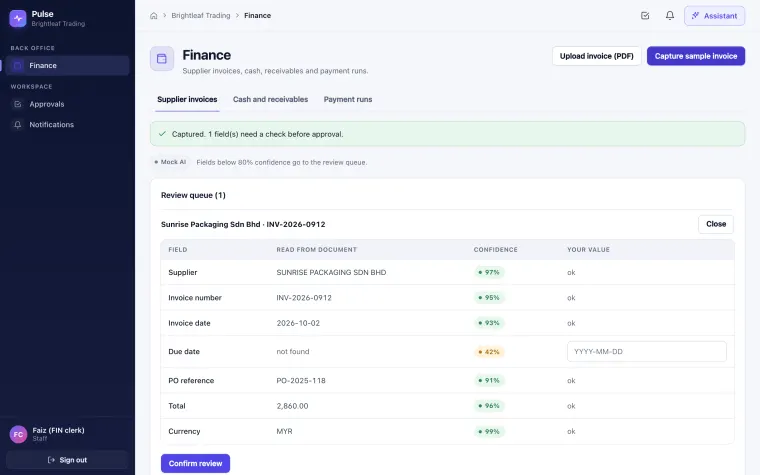
- Capture the invoice. Upload the supplier's PDF. AI reads the supplier name, invoice number, invoice date, due date, PO reference, total and currency. In Pulse, each field gets a confidence score, and nothing is posted yet. In the demo, capture runs on Pulse's scripted engine, which reads the PDF's text; live AI capture is built but not yet run with a real key.
- Check the doubtful fields. A person confirms or corrects only the fields the AI is unsure about, for example a due date printed as "30 days" instead of a date. In Pulse, fields below 80% confidence (the demo setting) go to a review queue; the invoice is ready only when they are confirmed.
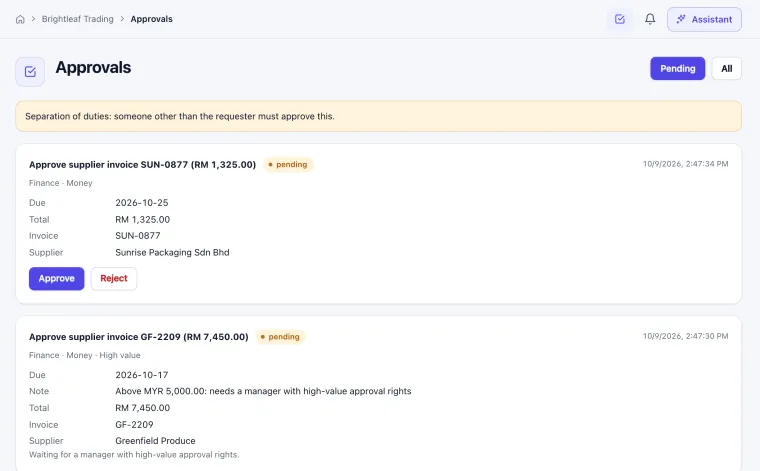
- Approve the invoice. Someone other than the person who recorded it approves it. In Pulse, every supplier invoice needs a person's approval, and an invoice above MYR 5,000 (the demo amount) needs an approver with high-value finance permission. The person who raised the request can't approve it.
- Plan the payment run. Group approved invoices that are due soon into one run. In Pulse, a proposed run picks approved invoices due in the next 14 days and needs its own approval, with the same high-value rule.
- Record the payment. When the run is approved and carried out, the invoices are marked paid and the decision history stays in the audit log. Pulse records the run and marks the invoices paid; it does not send money or connect to your bank, so your team pays through the bank as usual. The 30-day cash view shows what is due to suppliers next to what customers owe you.
Can AI approve supplier invoices on its own?
It shouldn't. AI is useful for reading the invoice and flagging fields it isn't sure about, but a named person should approve every invoice and every payment. Good software makes that approval a recorded step the AI cannot skip.
In Pulse, money actions never go beyond "act with approval", and an approval is tied to one exact version of the invoice: if the invoice changes after the request, the old approval no longer applies. See how Pulse keeps people in control.
Who should approve supplier invoices in a small company?
Someone other than the person who recorded the invoice, so that no single person can both enter and approve a payment. Above a set amount, a more senior person such as the owner or finance manager should approve.
| Role | Does | Example in the Pulse demo |
|---|---|---|
| Clerk | Uploads the PDF and checks doubtful fields | Faiz, finance clerk |
| Approver | Approves invoices up to the set amount | Farah, accounts executive |
| Senior approver | Approves invoices and payment runs above the set amount | Ben Tan, operations manager |
What should be checked before approving?
- The supplier and bank details match what you already hold.
- The invoice matches a purchase order and what was actually received.
- The invoice number hasn't been recorded before.
- The total, currency and due date are right.
Pulse links each invoice to its purchase order using the PO reference and shows the order, goods received and invoice together; checking that quantities and prices agree is still a person's check.
Does Pulse support e-invoices from MyInvois?
Not in the current build. Pulse captures supplier invoices from PDF files. If your suppliers send e-invoices through LHDN's MyInvois system, tell us during the demo so we can discuss what a project would need.
Want to see these five steps with a high-value invoice and two different approvers? See what happens in a demo, or read how to choose AI business software.
Published 9 October 2026 by Avantix Innovation Sdn. Bhd., Penang.