Nine departments on the same records.
Each Pulse module gives one team its own screens, and shares its records with the others. Here is what every module does, what the AI does in it, and what always needs a person.
Management
The whole company on one screen, every morning.
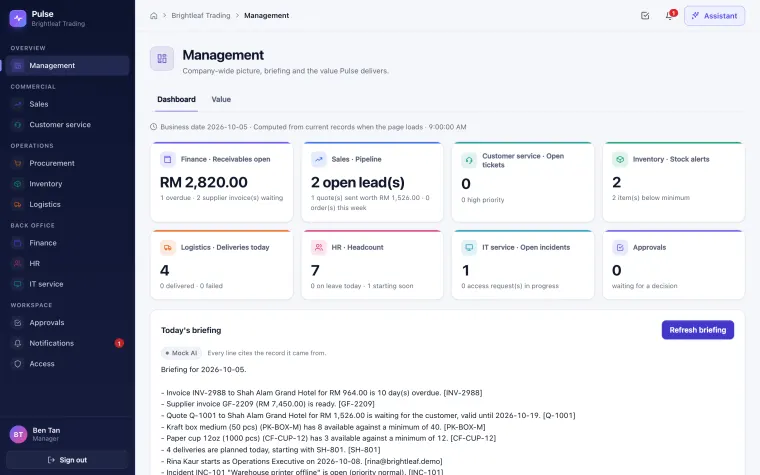
The Management module gives owners and managers one dashboard across every department the company uses, an approvals inbox, and an AI briefing that cites the records behind each point. Staff see the same screens limited to their own departments.
- Tiles for receivables, pipeline, open tickets, stock alerts, deliveries, headcount, IT incidents and approvals
- Each tile says when it was computed; a switched-off department shows as unavailable
- Ask questions such as "Which invoices are overdue?" and get answers from your own records, each figure cited
- One approvals inbox across all departments
- Time saved by AI: an estimate of staff time the AI saved, task by task. Each AI-assisted task counts a fixed number of minutes, for example 20 for a drafted quote; it does not time your staff. In the demo the numbers come from fictional data.
AI: the daily briefing reads today's figures from every module you can use and cites each record, for example [INV-2988].
Role-based: everyone sees only what their role allows, on every screen and in every AI answer. For example, a staff member assigned only to Management does not see Finance or HR figures.
Included in Starter, Growth and Scale.
Sales
From enquiry to order without retyping.
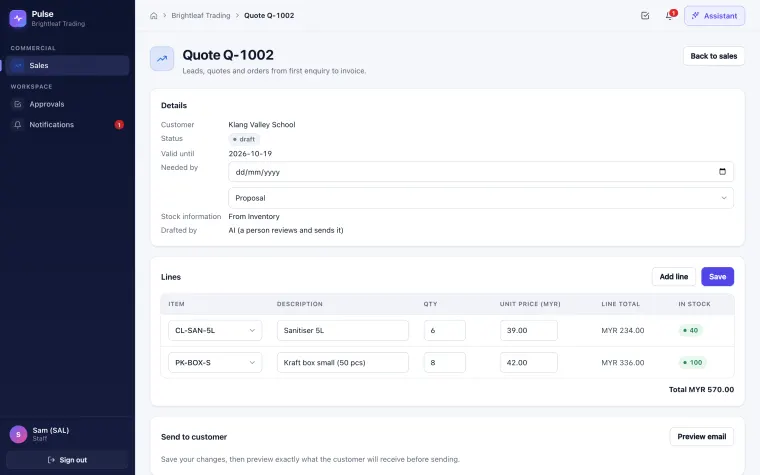
The Sales module tracks leads, quotes and orders, and turns a customer conversation into a priced quote with live stock on every line.
- A lead list with customer, source and stage
- Turn a WhatsApp or email conversation into a lead, with a duplicate-lead check
- Quotes priced from the catalogue; the version sent is exactly the one previewed, and a changed quote must be previewed again
- Stock-out risk alerts on open quotes, sent to Sales and Purchasing
- Quote to sales order in one step; delivery and invoice follow automatically
AI: drafts the quote from the conversation (a draft only). Sending it needs a preview of the exact email and a person's click.
Included in Starter, Growth and Scale.
Customer service
Every conversation in one inbox, answered from your own documents.
The Customer service module collects WhatsApp and email messages into one inbox as tickets, and suggests replies that cite your own knowledge base.
- WhatsApp and email become tickets linked to the customer, with attachments and threads
- AI classification and priority for each new message
- A knowledge base from your PDFs, Markdown and text files
- Upload a document, and the next reply suggestion can cite it
Always a person: replies are suggested, then previewed and confirmed before they are sent. In the demo, WhatsApp and email are simulated.
Included in Starter, Growth and Scale.
Harbor customer · email
Hi, what is your delivery cut-off time for next-day delivery?
Orders confirmed before the daily cut-off are delivered the next working day. [KB: Delivery schedule]
Cites the knowledge-base article it used. A person previews and sends.
Procurement
Low stock becomes an approved purchase order.
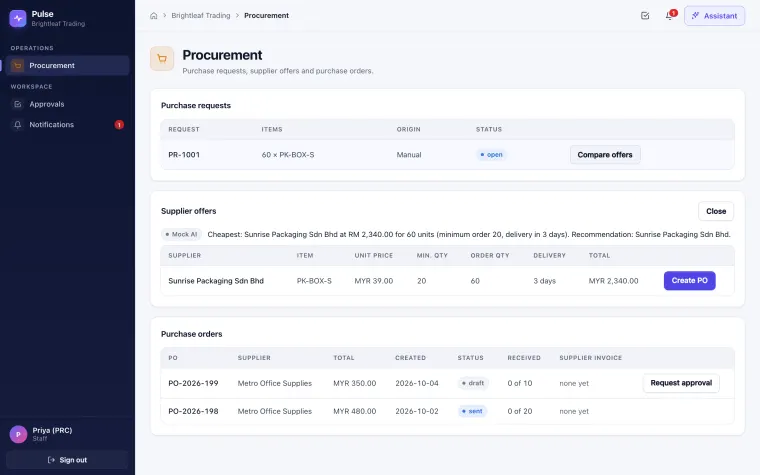
The Procurement module turns reorder suggestions into purchase requests, compares supplier offers, and sends purchase orders after a manager approves them.
- Suppliers and supplier price lists
- Purchase requests created once from a reorder suggestion, or by hand
- Offers compared on unit price, minimum quantity, delivery time and validity
- Purchase orders approved before they are sent; receipts and supplier invoices linked
AI: recommends the best offer and explains why. Always a person: approving and sending the PO.
Included in Growth and Scale. Need only purchase approvals? See the Avantix Procurement Portal.
Inventory
Know what's on the shelf, and why it changed.
The Inventory module keeps stock levels by item and location, records every movement, suggests reorders and receives goods against purchase orders.
- Items, locations and stock levels, with alerts below minimum
- Receipts, issues and adjustments, each with its source
- Reorder suggestions that Sales and Purchasing both see
- Goods receipts against a PO, including partial deliveries
AI: explains a stock difference by walking through the movements behind it.
Included in Growth and Scale.
Available
8minimum 40Suggested
Reordersent to PurchasingA quote that needs this item raises a stock-out risk alert for Sales and Purchasing.
Logistics
Today's deliveries, in order, on the driver's phone.
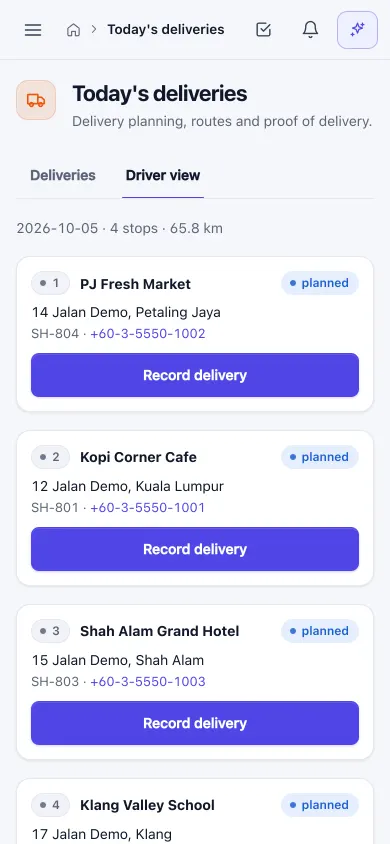
The Logistics module creates a shipment for every sales order, plans the day's stop order from the depot, and gives drivers a phone view to record each delivery.
- Shipments created once from each sales order
- Plans the day's stop order from the depot by distance, and shows the total distance
- A phone view for drivers: today's stops, with the receiver's name and an optional photo as proof of delivery
- Failed deliveries recorded with a reason
AI: proposes a new plan for failed deliveries. Always a person: a manager approves it.
Included in Scale.
Finance
Invoices read for you. Payments approved by people.
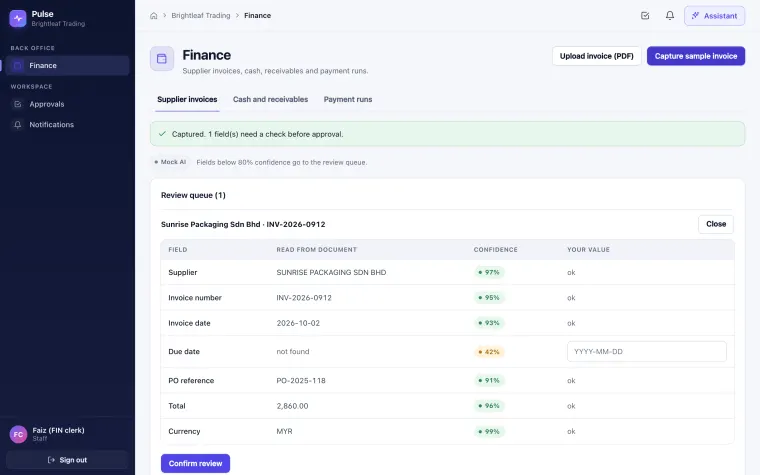
The Finance module captures supplier invoices from PDF, keeps a 30-day cash view, and prepares payment runs that always need approval.
- Supplier invoice capture from PDF, with a confidence score per field
- Fields below the confidence threshold go to a review queue before approval
- Customer invoices created once from each sales order, with an overdue list
- A 30-day cash view from receivables, payables and orders not yet invoiced (the cash impact of open orders), never counted twice
- Payment run proposals
Always a person: every payment needs approval, and amounts above a set limit (MYR 5,000 in the demo) need a high-value approver.
Included in Growth and Scale. Finance data is kept out of live AI until a data policy is agreed.
HR
Leave, onboarding and hiring without the paperwork.
The HR module keeps the employee directory, handles leave with balances and approvals, runs onboarding checklists, and screens CVs against a job description.
- Employees, departments and managers
- Leave requests, manager approval and balances
- Onboarding from a template; IT access requests are created automatically
- CV summary against a job description, with a confidence level
Always a person: HR actions need approval, and HR data stays out of live AI until a data policy is agreed.
Included in Scale.
- HRContract signed · first-day briefing
- ITEmail account requested · laptop assigned
- ITAccess to Sales module requested needs approval
IT
Access, laptops and incidents, tracked.
The IT module keeps an asset register, handles access requests from onboarding through approval to fulfilment, and triages incidents.
- Asset register with assignment to employees
- Access requests created from onboarding or by hand, approved, then fulfilled
- Duplicate requests handled once; partial failures recorded
- Incident tickets with an AI triage suggestion
Always a person: access must be approved, and the AI can never change roles, permissions or passwords.
Included in Scale. In the demo, the sign-in system that grants access is simulated.
- Reported by
- Finance team
- AI triage
- Hardware · low priority · suggest restarting the print server first
A suggestion only. The IT person decides.
Departments FAQ
Questions about the departments.
Which departments does Pulse cover?
Pulse has nine department modules: Management, Sales, Customer service, Procurement, Inventory, Logistics, Finance, HR and IT. They all work on the same set of company records.
Which plan includes which departments?
Starter includes Management, Sales and Customer service. Growth adds Procurement, Inventory and Finance. Scale includes all nine, adding Logistics, HR and IT. There is no public price yet: early-access pricing is discussed after a demo.
Can I start with only some departments?
Yes. Modules are switched on per company, so you can start with three departments and add more later. The AI names a switched-off department only as unavailable.
How do the departments share work?
Each step is created from the one before: a sales order creates a shipment in Logistics, low stock in Inventory becomes a purchase request in Procurement, and goods are received against the purchase order. Nobody retypes the same order.
Does every employee see every department?
No. Staff see only the departments their role allows, on every screen and in every AI answer. Owners and managers see the whole company on the Management dashboard.
Choosing between one system and separate tools? Read our guide to choosing AI business software.
Book a demo
See the departments you need, working together.
Tell us which departments hurt most. We'll show those modules in the working build with sample data.